
Microsoft Edge Add-ons
Visit Website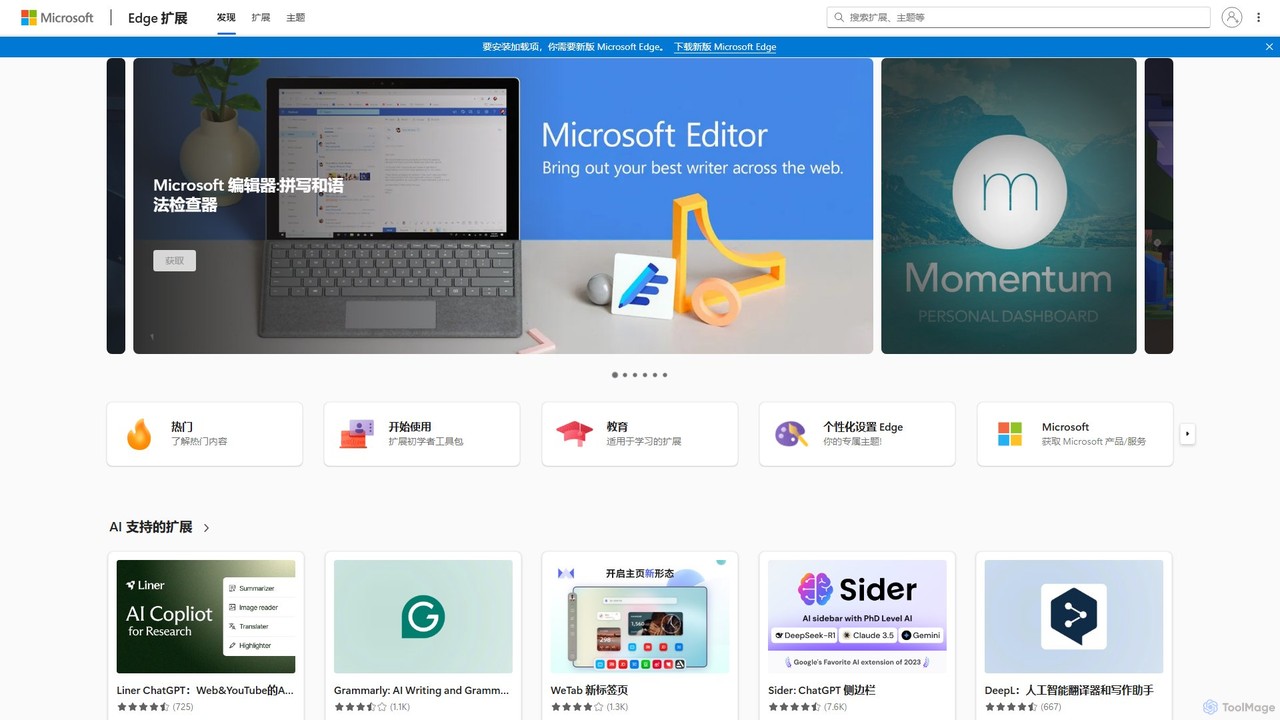
Microsoft Edge Add-ons Overview
Microsoft Edge Add-ons is the official and secure platform for discovering and installing extensions for the Microsoft Edge browser. It serves as a comprehensive marketplace, empowering users to significantly enhance their browser's functionality, tailor their online experience, and boost productivity. With a vast and growing library of add-ons, users can find tools for nearly any purpose, from blocking intrusive ads to integrating advanced AI assistants directly into their workflow. The platform is curated by Microsoft, ensuring a high standard of quality, security, and compatibility for all available extensions.
How to use Microsoft Edge Add-ons
Using the Microsoft Edge Add-ons store is a straightforward process integrated directly into the browser:
- Access the Store: Open Microsoft Edge and navigate to the Add-ons store. You can do this by clicking the three-dots menu (...) in the top-right corner, selecting 'Extensions', and then clicking 'Get extensions for Microsoft Edge'. Alternatively, you can go directly to the website.
- Discover Extensions: Browse through curated collections like 'Editor's picks', 'AI-powered extensions', or categories such as 'Productivity' and 'Education'. You can also use the search bar to find a specific add-on by name or function.
- Install an Add-on: Once you find an extension you want, click on its listing to view details, user reviews, and permissions. Click the 'Get' button to initiate the installation.
- Confirm Installation: A dialog box will appear asking for confirmation and listing the permissions the extension requires. Click 'Add extension' to complete the process.
- Manage Extensions: After installation, the extension's icon will typically appear in the Edge toolbar. You can manage all your installed add-ons by returning to the 'Extensions' menu, where you can enable, disable, remove, or configure them.
Core Features of Microsoft Edge Add-ons
- Vast Extension Library: Offers thousands of add-ons across numerous categories, including productivity, security, shopping, entertainment, and developer tools.
- AI-Powered Integration: Features a strong collection of AI extensions that bring the power of models like GPT-4o, Claude 3, and Gemini into the browser for tasks like summarizing content, writing assistance, and research (e.g., Sider, Liner).
- Enhanced Productivity: Includes essential tools like Grammarly for writing, Tampermonkey for custom scripts, powerful ad-blockers (AdGuard, uBlock Origin), and password managers (Bitwarden).
- Personalization and Customization: Allows users to change the browser's appearance with themes and customize the new tab page with extensions like Momentum or WeTab.
- Security and Trust: All extensions submitted to the store are reviewed and validated by Microsoft to protect users from malware and ensure they function as described.
- Seamless Browser Integration: Add-ons are designed to work flawlessly with Microsoft Edge, providing a stable and smooth user experience.
- Accessibility Tools: Provides extensions that make the web more accessible, such as text-to-speech readers (Speechify) and dark mode enablers (Dark Reader).
Use Cases for Microsoft Edge Add-ons
The platform caters to a wide range of users:
- Students and Researchers: Can use AI co-pilots to summarize articles and videos, employ citation managers, and use focus tools to avoid distractions while studying.
- Professionals and Writers: Leverage AI writing assistants and grammar checkers to draft high-quality documents and emails, and use screen capture tools for creating reports and presentations.
- Developers: Utilize user script managers like Tampermonkey, API testing tools, and other developer-focused extensions to streamline their workflow.
- Everyday Users: Enhance their daily browsing with ad-blockers for a cleaner web, coupon finders like Honey to save money, and password managers for improved security.
- Content Consumers: Use video speed controllers, picture-in-picture extensions, and video downloaders to improve their media consumption experience.
Advantages of Microsoft Edge Add-ons
The primary advantage is its status as the official, Microsoft-vetted source for extensions, which guarantees a high level of security and compatibility. The platform transforms the standard Edge browser into a highly versatile and personalized tool. Its strong emphasis on productivity and the integration of cutting-edge AI tools keep users at the forefront of technology. The easy discovery and management process makes it accessible to users of all technical levels.
Pricing and Plans
The Microsoft Edge Add-ons platform itself is completely free to use. The pricing of the extensions available on the store varies:
- Free: Many powerful and popular extensions are available at no cost.
- Freemium: Some extensions offer a free basic version with the option to upgrade to a paid premium plan for advanced features.
- Paid: A selection of specialized extensions may require a one-time purchase or a subscription.
Each extension's page clearly indicates its pricing model.
Microsoft Edge Add-ons Comments (0)
Log in to post comments
Log in nowMicrosoft Edge Add-ons Alternatives
View All
Opera
Opera is a smart, secure web browser with a native AI assistant, Aria. It offers innovative features like …
Opera is a smart, secure web browser with a native AI assistant, Aria. It offers innovative features like Tab Islands for organization, a free built-in VPN, and an ad blocker. Designed for speed and privacy, Opera provides a more productive and distraction-free browsing experience.

Visual Studio Marketplace
The official marketplace for discovering and installing thousands of extensions for the Visual Studio family of products, including …
The official marketplace for discovering and installing thousands of extensions for the Visual Studio family of products, including Visual Studio, VS Code, and Azure DevOps. Enhance productivity, add new features, and customize your development environment with tools from Microsoft and the community.

Taskavel
Taskavel is a comprehensive task and project management platform designed to keep teams aligned and tasks on track. …
Taskavel is a comprehensive task and project management platform designed to keep teams aligned and tasks on track. It offers intuitive tools like customizable Kanban boards, integrated time tracking, invoicing, and robust collaboration features, especially tailored for developers and agile teams.

AutoGPT
AutoGPT is a revolutionary open-source autonomous AI agent that leverages GPT-4 and GPT-3.5 to independently achieve complex goals. …
AutoGPT is a revolutionary open-source autonomous AI agent that leverages GPT-4 and GPT-3.5 to independently achieve complex goals. By breaking down high-level objectives into smaller, manageable subtasks, it can browse the web, write code, manage files, and execute plans with minimal human intervention, dramatically boosting productivity and automating complex workflows.

Raycast
Raycast is a blazingly fast, extendable launcher for macOS that supercharges your productivity. It replaces Spotlight with a …
Raycast is a blazingly fast, extendable launcher for macOS that supercharges your productivity. It replaces Spotlight with a powerful command-line interface to control your tools, search files, run scripts, and automate tasks. With an integrated AI assistant, a vast store of community-built extensions, and features like Clipboard History, Snippets, and Window Management, Raycast centralizes your workflow, saving you time and context-switching.

LobeHub
LobeHub is an all-in-one AI platform that allows you to build and manage a personalized team of AI …
LobeHub is an all-in-one AI platform that allows you to build and manage a personalized team of AI Agents. It offers a superior user experience to standard LLM interfaces like ChatGPT, with support for numerous models, plugins, and multi-modal interactions. Create, share, and use specialized agents for tasks ranging from coding and writing to academic research and daily life, all within a single, intuitive chat interface.

Opera
Opera is an innovative, multi-platform web browser supercharged with Aria, a native AI assistant. It offers a faster, …
Opera is an innovative, multi-platform web browser supercharged with Aria, a native AI assistant. It offers a faster, safer, and smarter browsing experience with a free built-in VPN, ad blocker, and specialized versions like Opera GX for gamers. Aria provides real-time web information, image generation, and advanced productivity features, all integrated seamlessly.

promptstart
promptstart is an advanced AI prompt engineering platform designed to help users create, manage, and optimize prompts for …
promptstart is an advanced AI prompt engineering platform designed to help users create, manage, and optimize prompts for various AI models. It features a vast library of pre-built prompts, an intelligent prompt builder, and an AI-powered optimizer to enhance the quality and efficiency of AI-generated content and code.

Ulaa Browser
Ulaa Browser, by Zoho, is a privacy-first, Chromium-based web browser designed for individuals and enterprises. It champions security …
Ulaa Browser, by Zoho, is a privacy-first, Chromium-based web browser designed for individuals and enterprises. It champions security with a built-in ad blocker, phishing protection, and unique browsing "Modes" to isolate work, personal, and other contexts. For businesses, Ulaa Enterprise offers advanced data loss prevention, centralized management, and AI-powered intelligence by Zia to create a secure and productive browsing environment.

BoltAI
BoltAI is a native, high-performance AI assistant for macOS that integrates multiple AI models like GPT, Claude, and …
BoltAI is a native, high-performance AI assistant for macOS that integrates multiple AI models like GPT, Claude, and local models directly into your workflow. It offers features like an in-IDE coding assistant, custom AI assistants, a prompt library, and powerful plugins to boost productivity for developers, writers, and professionals.
Microsoft Edge Add-ons Category
Microsoft Edge Add-ons Tag
Microsoft Edge Add-ons AI Tool Comparison
Microsoft Edge Add-ons Embed Feature
Just copy the embed code below and paste this beautiful badge on your blog, article, or official app website to drive traffic directly to this tool's detail page and quickly boost your exposure and user count!

No comments yet, be the first to comment!